
App Development

Why Apple Rejects Creator Apps (And How to Pass)

Foundry
June 22, 2026
Share
Why Apple Rejects Creator Apps (And How to Pass)

Get Creator Revenue Insights

How creators are turning audiences into subscription businesses
Share
You built the app. You recorded the launch announcement. You scheduled the post that tells your audience to go download it. Then Apple sends a one-paragraph rejection notice and your launch is dead on the runway. Apple rejects creator apps for App Store review failures more often than almost any creator expects, and the reasons are predictable. In 2024, App Review looked at over 7.7 million submissions and rejected more than 1.9 million of them (Apple, 2025). That's roughly one in four. The creators who sail through aren't lucky. They know what Apple's reviewers are looking for and they build for it from day one. This guide breaks down the five rejection reasons that catch creator apps, and exactly how to clear each one. Key Takeaways:
  • Apple rejected over 1.9 million app submissions in 2024 out of 7.7 million reviewed, roughly a 25% rejection rate (Apple, 2025).
  • Guideline 4.2 (Minimum Functionality) is the top killer for creator apps: anything that looks like a wrapped website gets rejected.
  • Guideline 3.1.1 forces all digital content sales through Apple's in-app purchase system, so creators who bolt on a Stripe checkout get bounced.
  • Apple rejected 400,000 submissions for privacy violations and over 320,000 for being spam, copycat, or misleading in 2024 alone.
  • A rejection isn't a one-time hurdle. Guidelines change constantly, and every app update gets re-reviewed, which is why ongoing submission management matters more than the first approval.
Apple rejects about a quarter of everything submitted to the App Store. In 2024, reviewers processed more than 7.7 million submissions and turned away over 1.9 million of them (Apple, 2025). In 2025 that rejection number climbed past 2 million as Apple tightened its review process further. What is App Store review? It's the manual and automated check every iOS app goes through before it can appear on the App Store, and again every time you ship an update. A team of human reviewers tests your app against Apple's App Store Review Guidelines, a public document covering safety, performance, business model, design, and legal compliance. Here's how those 2024 rejections broke down across the categories that matter most to creators:
Rejection Reason2024 Submissions RejectedWho It Hits
Privacy violations400,000Apps with sloppy data collection
Spam, copycat, or misleading320,000Lookalike and low-effort apps
Hidden or undocumented features43,000Apps hiding functionality from review
These aren't edge cases. They're the exact traps a creator falls into when an app gets thrown together fast without anyone who knows what review actually checks for. The single biggest one isn't even in that table, because it's a quality bar, not a fraud category. It's minimum functionality. Guideline 4.2, Minimum Functionality, rejects creator apps that feel like a website in a wrapper instead of a real native app. This is the number one reason creator apps die in review, and it's almost always the result of cutting corners on the build. Apple's rule is direct: your app must include features, content, and a user experience that go beyond what someone could get by opening your website in Safari. If your "app" is just your existing web content loaded inside a full-screen browser window, Apple rejects it. Reviewers can tell. They look for native navigation, real offline behavior, push notifications, and an interface that uses the phone like a phone, not like a tiny browser. This is where the vibe-coding tools fall apart. You can prompt Replit or Lovable into something that looks like an app on screen, but what you usually get is a thin web view with no native depth. We covered why in detail in the vibe coding trap: the demo looks finished, the App Store submission is where it dies. A reviewer opens it, sees a webpage pretending to be an app, and cites 4.2. To pass Guideline 4.2, a creator app needs:
  • Native navigation patterns, not browser back buttons
  • Content or tools that work offline or store data locally
  • Push notifications that do something useful
  • A reason to exist on the home screen that a bookmark couldn't replace
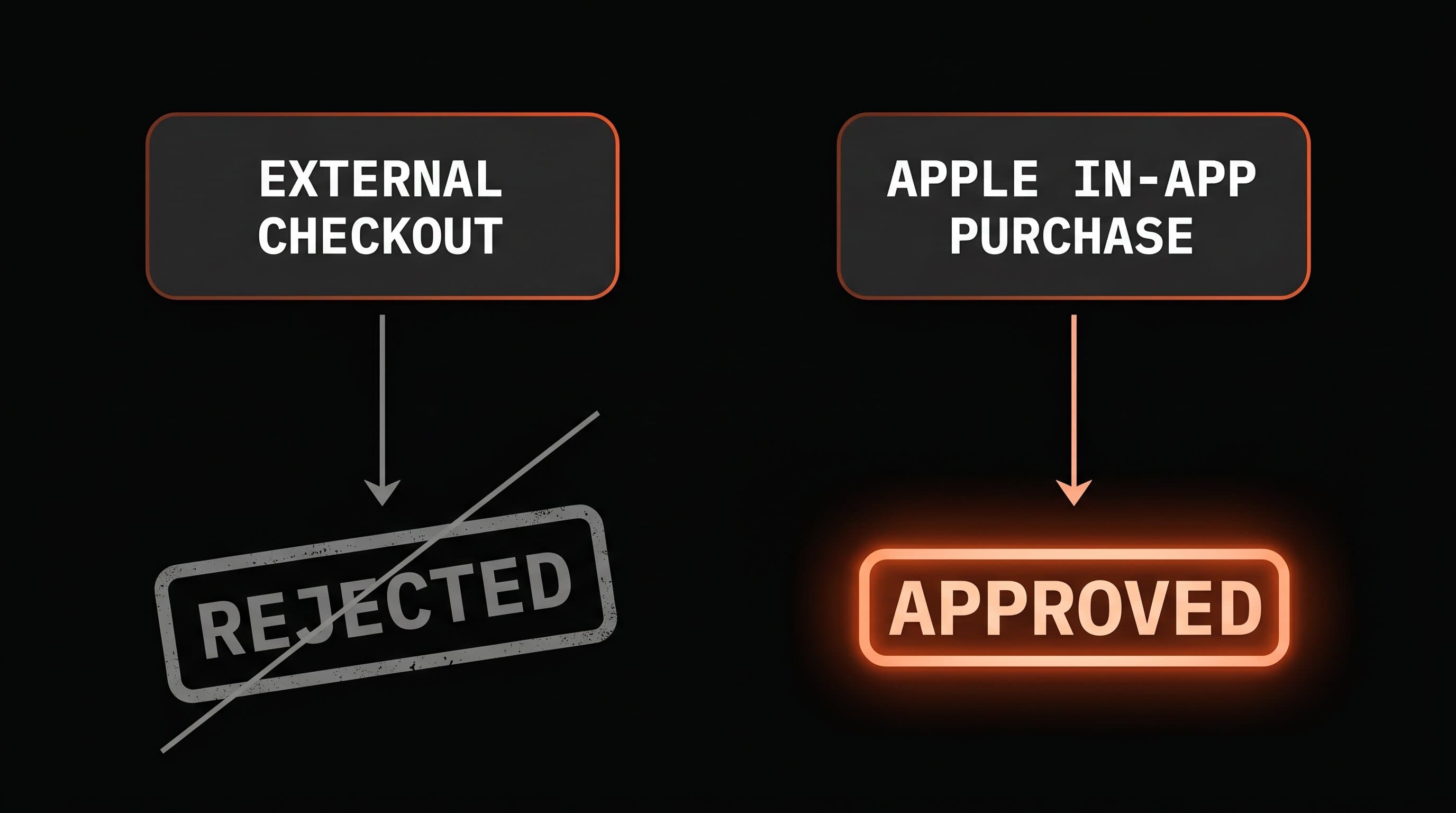
Guideline 3.1.1 requires every sale of digital content inside an iOS app to run through Apple's in-app purchase system, and creators who try to route around it get rejected. This is the rule that surprises people who are used to selling on the web. On your website, you can charge through Stripe, PayPal, or any processor you like. Inside an iOS app, if you're selling access to digital content, a subscription, a course, premium features, unlockable content, you must use Apple's in-app purchase, and Apple takes its commission. Try to sneak a credit card form or a "subscribe on our website" link into the app and Apple bounces it under 3.1.1.
Diagram comparing a rejected app routing payments through an external checkout versus an approved app using Apple in-app purchase
The fix isn't fighting the rule. It's building in-app purchase correctly from the start: real subscription products configured in App Store Connect, working purchase and restore flows, clear pricing and renewal terms shown before the user pays. Get any of that wrong and you also risk a Guideline 2.1 rejection for an incomplete app, which Apple cites when purchases don't function during review. Apple's cut is a real cost, but it's a manageable one once you understand it. We broke the full economics down in the true cost of a creator app, including how the Small Business Program drops the commission to 15%. Beyond functionality and payments, three more guidelines reject creator apps regularly. Each one is avoidable with the right preparation. Privacy (Guideline 5.1.1). Apple rejected 400,000 submissions for privacy violations in 2024 (Apple, 2025). If your app collects any data, you need a working privacy policy, accurate privacy "nutrition labels" in App Store Connect, and permission prompts that explain why you need access to the camera, contacts, or location. Vague or missing privacy disclosures are an instant bounce. Spam and copycat apps (Guideline 4.3). Over 320,000 submissions were rejected as spam, copycat, or misleading in 2024. If your app looks like a clone of something already on the store, or if its name and screenshots oversell what it does, reviewers reject it. Originality and honest store listings matter. Hidden features (Guideline 2.3.1). Apple rejected over 43,000 submissions for hidden or undocumented features in 2024. Anything that behaves differently in review than in production, hidden screens, features that "turn on" later, gets flagged. Your app has to be exactly what it says it is. Here's how the five reasons stack up for a typical creator app:
GuidelineWhat Apple ChecksMost Common Creator Mistake
4.2 Minimum FunctionalityNative, app-like experienceShipping a wrapped website
3.1.1 In-App PurchaseDigital sales use Apple IAPBolting on an external checkout
5.1.1 PrivacyData handling and disclosuresMissing or vague privacy policy
4.3 SpamOriginality and honest listingCloning an existing app
2.3.1 Hidden FeaturesApp matches its descriptionUndocumented or delayed features
You can read Apple's own list of common app rejections on the developer site. Every item on it is a place where a rushed build fails and a deliberate one passes. Passing review once doesn't mean you're done with it. Apple re-reviews your app every single time you ship an update, and the guidelines themselves change several times a year. The app that passed in March can fail in September because Apple sharpened a rule. This is the part creators underestimate. Building the app is the start. Keeping it live through OS updates, new guideline versions, and the constant cycle of bug fixes and feature releases is the actual job. Every one of those updates is another trip through review, another chance to get rejected for something that was fine last quarter. This is the whole reason we treat submission and resubmission as an ongoing service, not a one-time handoff, in our app care model. It's also why the choice of who builds your app matters more than creators think. A freelancer who disappears after launch leaves you to face review alone the first time Apple changes a rule. We wrote about this gap in why creators need product partners, not developers: the code is the easy part, the relationship with the App Store is the part that never ends. A creator app passes App Store review when it's built like a real product from the start, not patched into one before submission. The checklist is short but unforgiving:
  • Build native, not wrapped. Real navigation, offline handling, push notifications. Clear Guideline 4.2 before you write a single line of marketing.
  • Set up in-app purchase properly. Configure subscriptions in App Store Connect, build working purchase and restore flows, show pricing and renewal terms before the charge.
  • Get privacy right. A real privacy policy, accurate nutrition labels, honest permission prompts.
  • Be original and honest. A unique app and a store listing that matches what the app actually does.
  • Plan for the next update, not just launch. Whoever builds it should still be there when Apple changes the rules.
Most creators never clear step one, because they tried to build it themselves with an AI tool or a cheap freelancer and ended up with a wrapped website that Apple was always going to reject. That's not a failure of effort. It's a failure of knowing what review checks for. We've taken apps through this process across every kind of creator business, and the difference between a first-try approval and a month of rejection loops is knowing the rules before you build, not after. Want an app that passes review the first time? We build custom apps for creators, $0 upfront, 3-week delivery, and we handle every App Store submission and resubmission forever.
Let's Build →
The most common reasons are Guideline 4.2 (the app feels like a wrapped website instead of a native app), Guideline 3.1.1 (selling digital content without using Apple's in-app purchase), and Guideline 5.1.1 (missing or vague privacy disclosures). Apple's rejection notice cites the specific guideline number, which tells you exactly what to fix. Most apps are reviewed within 24 to 48 hours, though it can take longer for complex apps or during busy submission periods. A rejection restarts the clock: you fix the issue, resubmit, and wait for another review cycle, which is why getting it right the first time matters. No. If you're selling access to digital content or features inside an iOS app, Guideline 3.1.1 requires you to use Apple's in-app purchase system. External checkouts for digital goods get rejected. Apple takes a 15% to 30% commission depending on your revenue and how long someone has subscribed. Usually not on the first try. These tools often produce a web view wrapped to look like an app, which Apple rejects under Guideline 4.2 for minimum functionality. Passing review reliably requires native features, working in-app purchase, and proper privacy handling that those tools don't build by default. Yes. Every update goes through App Store review again, and Apple changes its guidelines several times a year. An app that passed last quarter can be rejected on its next update if a rule changed, which is why ongoing submission management is part of running a creator app, not a one-time task.

Creator app strategy

Want us to review your creator business?

Apply for a Foundry Creator App Review. We'll tell you whether there is a real app opportunity hiding in your audience.

Why Apple Rejects Creator Apps (And How to Pass)